




In the modern digital world, computer networking has become the foundation of communication, data sharing, and information exchange. Every time you browse the internet, send an email, or play an online game, you are using a network. But what exactly is computer networking, and why is it so essential today?
Computer networking is the process of connecting multiple computers, devices, and systems together so they can communicate and share resources. These resources can include files, printers, applications, and even internet connections. Networking allows individuals and organizations to exchange data efficiently, regardless of their physical location.
This beginner’s guide will explain the basics of computer networking, including its types, components, importance, and how it works — in simple terms that anyone can understand.
What Is Computer Networking?
Computer networking refers to a group of interconnected computers that communicate with each other to share information and resources. These networks can be as small as two devices in a home or as large as the global Internet.
In simpler words, networking allows devices to talk to each other — whether it’s sending an email, accessing a website, or printing a document from another room.
The main goal of networking is communication and resource sharing. Through networks, data can travel from one computer to another using physical cables or wireless signals.
How Computer Networks Work
To understand how computer networks work, imagine sending a letter. You write the message (data), address it to someone (destination IP address), send it through a delivery system (network), and it eventually reaches the right person (the receiving computer).
In networking:
-
Data is divided into small packets.
-
Network devices (like routers and switches) direct those packets toward their destination.
-
Protocols like TCP/IP ensure the data is delivered accurately and in the correct order.
All this happens in milliseconds, making communication appear instant.
Basic Components of a Computer Network
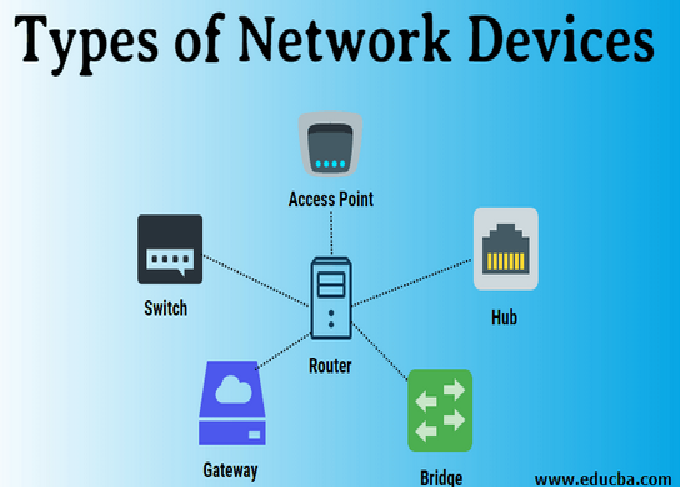
A network consists of several essential components that work together to transfer data. Let’s explore each:
1. Computers and Devices
These are the end systems, also called nodes or hosts. Examples include PCs, laptops, smartphones, printers, and servers.
2. Network Interface Card (NIC)
Every device that connects to a network needs a NIC. It’s the hardware that allows communication over the network.
3. Switches
Switches are devices that connect multiple computers within a local area network (LAN). They direct data only to the device that needs it, improving efficiency.
4. Routers
Routers connect multiple networks together and guide data packets between them. For example, a router connects your home network to the Internet.
5. Cables and Connectors
These include Ethernet cables, fiber optics, and connectors that transmit data between devices.
6. Wireless Access Points (WAPs)
These devices allow wireless connections using Wi-Fi technology, making it possible for laptops and smartphones to connect without cables.
7. Modems
A modem converts digital data from a computer into analog signals for transmission over telephone or cable lines — and vice versa.
8. Firewalls
Firewalls protect networks by filtering incoming and outgoing traffic, blocking unauthorized access.
Types of Computer Networks
Networks are categorized based on their size, distance, and purpose. Here are the main types:
1. Local Area Network (LAN)
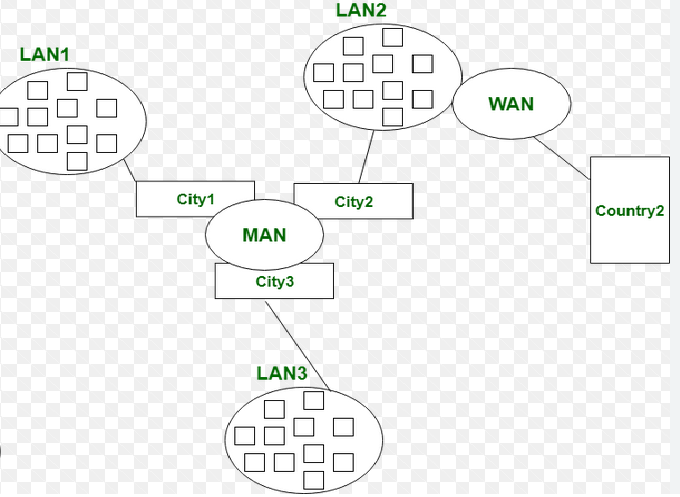
A LAN covers a small area, like a home, office, or school. It connects computers within a limited distance and typically uses Ethernet cables or Wi-Fi.
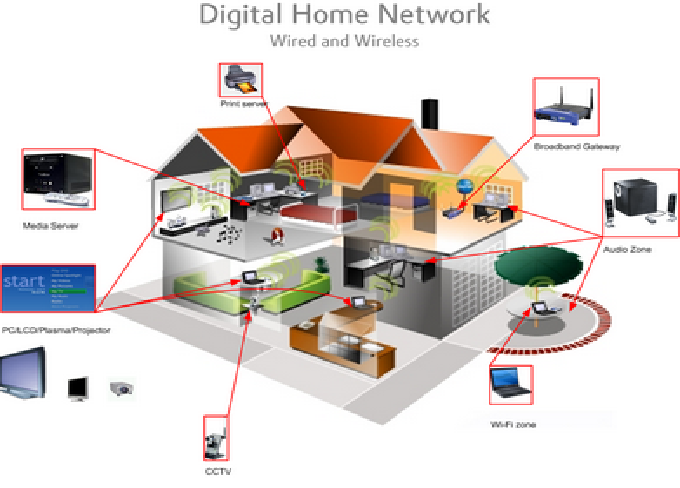
Example: The network in your home that connects your PC, printer, and smart TV.
2. Wide Area Network (WAN)
A WAN covers a large geographical area, connecting multiple LANs. The Internet is the best example of a WAN. Organizations use WANs to connect offices in different cities or countries.
3. Metropolitan Area Network (MAN)
A MAN is larger than a LAN but smaller than a WAN. It typically covers a city or campus.
Example: A university network connecting multiple campuses within the same city.
4. Personal Area Network (PAN)
A PAN connects personal devices over a short range — usually within a few meters.
Example: Connecting your smartphone to your laptop via Bluetooth.
5. Wireless Local Area Network (WLAN)
WLAN is a LAN that uses wireless technology instead of cables. Wi-Fi networks in homes and offices are examples of WLANs.
6. Virtual Private Network (VPN)
A VPN creates a secure, encrypted connection over the Internet, allowing users to access private networks remotely.
Network Topologies
Network topology refers to the physical or logical arrangement of devices in a network. The common types are:
1. Bus Topology
All devices share a single communication line. It’s simple but can be slow when many devices are connected.
2. Star Topology
All devices connect to a central switch or hub. It’s fast and easy to manage, but the whole network can fail if the central device stops working.
3. Ring Topology
Each device connects to two others, forming a ring. Data travels in one direction.
4. Mesh Topology
Every device connects to every other device. It’s reliable but expensive to set up.
5. Hybrid Topology
Combines two or more topologies to balance cost, performance, and reliability.
Types of Network Connections
There are two main ways devices can connect in a network:
1. Wired Connections
These use cables like Ethernet or fiber optics for high-speed and stable communication.
2. Wireless Connections
Wireless networks use radio waves, infrared, or satellite signals. Wi-Fi, Bluetooth, and 4G/5G are examples.
Each connection type has advantages — wired networks offer speed and stability, while wireless networks provide flexibility and mobility.
Network Protocols: The Rules of Communication
Network protocols are sets of rules that define how data is transmitted and received. Without protocols, devices wouldn’t understand each other.
Some important protocols include:
-
TCP/IP (Transmission Control Protocol / Internet Protocol): The foundation of the Internet.
-
HTTP/HTTPS: Used for web browsing.
-
FTP (File Transfer Protocol): For transferring files between computers.
-
SMTP/POP3/IMAP: For sending and receiving emails.
-
DNS (Domain Name System): Translates domain names into IP addresses.
Protocols ensure that data reaches the correct destination securely and reliably.
IP Address and DNS
Every device in a network needs a unique identifier called an IP address (Internet Protocol address). It’s like a postal address for your computer.
There are two types of IP addresses:
-
IPv4: Uses 32-bit numbers (e.g., 192.168.1.1).
-
IPv6: Uses 128-bit numbers for more combinations (e.g., 2001:0db8::1).
The DNS (Domain Name System) converts human-readable names (like www.google.com) into IP addresses that computers understand.
Importance of Computer Networking
Networking plays a vital role in today’s world for both individuals and businesses. Some major benefits include:
1. Data Sharing
Networking allows multiple users to share files and data instantly.
2. Resource Sharing
Printers, storage devices, and internet connections can be shared among many users, reducing costs.
3. Communication
Emails, video calls, and instant messages are all possible due to networking.
4. Centralized Data Management
Organizations can store and manage data from one central location, improving security and efficiency.
5. Remote Access
Networking enables employees to access systems from anywhere through VPNs or cloud platforms.
6. Scalability
Networks can grow as an organization expands by adding new devices and users.
Examples of Networking in Daily Life
-
Home Networks: Sharing internet and printers between family devices.
-
Office Networks: Connecting employees to file servers and communication tools.
-
Educational Institutions: Linking classrooms, libraries, and labs.
-
Hospitals: Connecting doctors to patient records and diagnostic systems.
-
Banks: Linking ATMs and branches across the country.
Network Security Basics
With great connectivity comes great responsibility. Network security ensures that data traveling across a network remains safe from unauthorized access, attacks, and breaches.
Common security measures include:
-
Firewalls: Block malicious traffic.
-
Antivirus Software: Protects devices from malware.
-
Encryption: Converts data into unreadable format for outsiders.
-
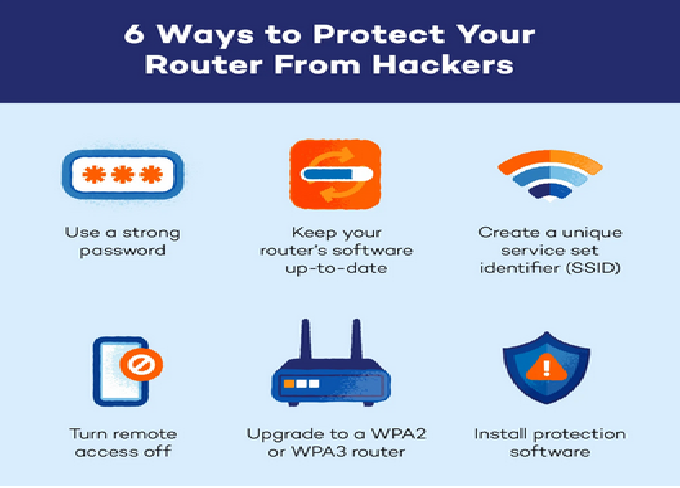
Strong Passwords: Prevent unauthorized logins.
-
Two-Factor Authentication (2FA): Adds an extra layer of protection.
Cloud Networking and Modern Trends
Modern networking has evolved far beyond traditional LAN and WAN setups. The rise of cloud computing and the Internet of Things (IoT) has transformed how networks operate.
1. Cloud Networking
Cloud services allow data and applications to be stored online, accessible from anywhere. Companies like Microsoft Azure, AWS, and Google Cloud provide such services.
2. Software-Defined Networking (SDN)
SDN allows network administrators to control network behavior through software, improving flexibility and automation.
3. Internet of Things (IoT)
IoT connects smart devices — from refrigerators to security cameras — enabling automation and real-time data sharing.
4. 5G Networks
5G offers ultra-fast wireless communication, enhancing mobile networking and supporting technologies like autonomous vehicles and smart cities.
Challenges in Computer Networking
Even though networks are powerful, they also face challenges such as:
-
Network Downtime: System failures can disrupt communication.
-
Security Threats: Hacking, phishing, and data breaches.
-
Bandwidth Limitations: Too much traffic can slow down networks.
-
Maintenance Costs: Large networks require constant monitoring and upgrades.
Careers in Computer Networking
Computer networking offers a wide range of career opportunities for IT professionals, such as:
-
Network Administrator
-
Network Engineer
-
Network Security Specialist
-
System Administrator
-
Cloud Network Engineer
-
Network Architect
Earning certifications like Cisco CCNA, CompTIA Network+, or Juniper JNCIA can boost your networking career significantly.
Future of Computer Networking
The future of networking is heading toward automation, speed, and intelligent connectivity. Technologies like AI-driven network management, 6G communication, and quantum networking are on the horizon.
As digital transformation continues, networking will remain a key driver of innovation in every industry — from healthcare and education to business and entertainment.
Conclusion
Computer networking is the invisible backbone of the digital world. It connects people, devices, and systems across the globe, enabling seamless communication and data sharing.
Whether you’re streaming a movie, sending a business email, or backing up files to the cloud — networking is what makes it all possible.