




The Internet is a vast network that connects billions of devices around the world. But have you ever wondered how your computer, smartphone, or tablet communicates with other devices online? Every device connected to the Internet or a local network needs a unique identity — something that helps it send and receive information accurately. This identity is called an IP address.
Along with the IP address, two other important components — the Subnet Mask and the Gateway — play vital roles in determining how data travels within and outside a network. If you’ve ever configured a network connection or checked your Wi-Fi settings, you’ve probably seen these terms but might not fully understand what they mean.
In this article, we’ll break down these three fundamental networking terms — IP Address, Subnet Mask, and Gateway — in simple and easy-to-understand language. By the end, you’ll know how they work together to make networking possible.
1. What Is an IP Address?
An IP Address (Internet Protocol Address) is like a digital home address for your device. Just as your home has a postal address that identifies it on a map, your device has an IP address that identifies it on a network or the Internet.
It is a unique number assigned to every device connected to a network so that it can send and receive information.
2. How an IP Address Works
Imagine you want to send a letter to a friend. You need their exact address to make sure the letter reaches them. Similarly, when your computer sends a request (like opening a website), it must know the destination IP address to send the data correctly.
When data travels across the Internet, it is divided into small packets. Each packet contains:
-
The source IP address (where it came from)
-
The destination IP address (where it’s going)
This ensures that the data reaches the correct destination and that responses return to the right device.
3. Types of IP Addresses
There are two main versions of IP addresses in use today:
a) IPv4 (Internet Protocol version 4)
IPv4 is the older and most widely used format. It uses a 32-bit addressing system and looks like this:
It is divided into four parts (called octets), each ranging from 0 to 255. However, since IPv4 can only support around 4 billion unique addresses, we began to run out of available IPs.
b) IPv6 (Internet Protocol version 6)
IPv6 was created to solve the problem of address exhaustion. It uses a 128-bit addressing system and can support trillions of unique addresses. An IPv6 address looks like this:
IPv6 is longer, but it ensures that every modern device can have a unique address, even as the number of Internet-connected devices grows.
4. Types of IP Addresses (Based on Usage)
Not all IP addresses are used in the same way. There are two main types based on usage:
a) Public IP Address
A public IP address is the address used on the Internet. It is assigned by your Internet Service Provider (ISP) and identifies your device or network globally. Think of it as your home’s street address visible to the outside world.
b) Private IP Address
A private IP address is used within a local network (like your home Wi-Fi). It helps devices in your house communicate with each other without being directly accessible from the Internet.
Examples of private IP ranges:
-
192.168.x.x
-
10.x.x.x
-
172.16.x.x to 172.31.x.x
Your router usually assigns private IPs to devices automatically.
5. Dynamic vs. Static IP Addresses
IP addresses can also be classified based on how they are assigned:
a) Dynamic IP Address
A dynamic IP address changes over time. Most home Internet connections use dynamic IPs assigned automatically by the ISP using DHCP (Dynamic Host Configuration Protocol).
It’s convenient because users don’t need to manually configure anything.
b) Static IP Address
A static IP address does not change. It is manually assigned and stays the same unless changed by the network administrator.
Businesses often use static IPs for servers and devices that need a permanent address.
6. What Is a Subnet Mask?
Now that you understand IP addresses, let’s talk about the Subnet Mask.
A Subnet Mask is a number that helps divide an IP address into two parts:
-
The Network part – identifies which network the device belongs to.
-
The Host part – identifies the specific device within that network.
You can think of it like a neighborhood and house number system. The network part is the “neighborhood,” and the host part is the “house number.”
7. Why We Need a Subnet Mask
Without a subnet mask, a computer would not know which part of an IP address refers to the network and which part refers to the specific device.
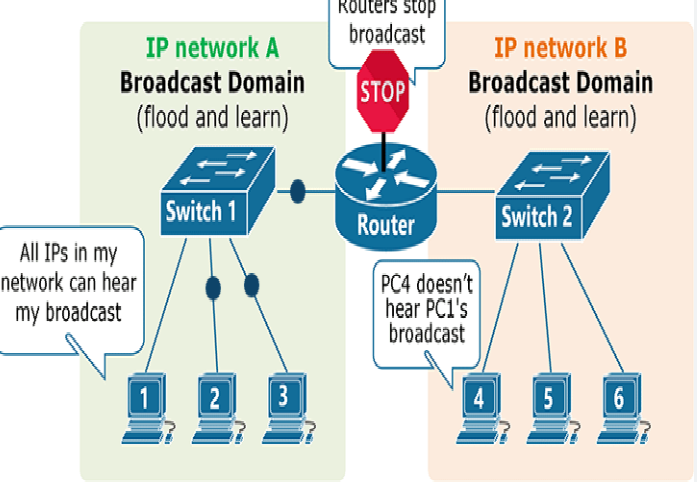
The subnet mask allows routers and computers to identify whether a device is within the same local network or if it needs to send data outside (to another network or over the Internet).
8. Example of Subnet Mask in Action
Let’s say you have the following:
Here’s what it means:
-
The first three numbers (192.168.1) identify the network.
-
The last number (10) identifies the host (device) within that network.
This subnet mask tells the computer that all devices with IP addresses from 192.168.1.1 to 192.168.1.254 are on the same local network.
9. Common Subnet Masks and Their Meanings
| Subnet Mask | Network Size | Number of Hosts |
|---|---|---|
| 255.0.0.0 | Very large network | 16 million+ |
| 255.255.0.0 | Medium network | 65,000+ |
| 255.255.255.0 | Small local network | 254 hosts |
| 255.255.255.255 | Single device | 1 host |
Subnet masks are often written using CIDR (Classless Inter-Domain Routing) notation, like this:
-
192.168.1.10/24 → means 255.255.255.0
-
10.0.0.1/8 → means 255.0.0.0
10. What Is a Default Gateway?
A Default Gateway acts as a bridge between your local network and other networks, including the Internet.
Think of it as the “exit door” for your network. When a device needs to send data to an IP address outside its local network, the data first goes to the gateway, which then forwards it to its destination.
Usually, the default gateway is your router’s IP address.
Example:
Here, 192.168.1.1 (the router) sends data from your local network to the Internet.
11. How IP Address, Subnet Mask, and Gateway Work Together
Let’s understand with a simple example:
Imagine you are sending a message from your phone (IP: 192.168.1.10) to your laptop (IP: 192.168.1.15) at home.
-
Your phone checks the Subnet Mask (255.255.255.0) to see if the destination IP is in the same network.
-
Since both IPs are part of 192.168.1.x, the phone sends data directly to the laptop.
-
But if your phone wants to access google.com, which is outside your local network, it sends the data to the Default Gateway (your router).
-
The Router (Gateway) then forwards the data to the Internet and receives the response, sending it back to your phone.
This teamwork among IP, Subnet Mask, and Gateway ensures data reaches the right place efficiently.
12. Real-Life Example
Let’s take a look at a real-world setup in your home Wi-Fi:
| Device | IP Address | Subnet Mask | Gateway |
|---|---|---|---|
| Laptop | 192.168.1.2 | 255.255.255.0 | 192.168.1.1 |
| Smartphone | 192.168.1.3 | 255.255.255.0 | 192.168.1.1 |
| Smart TV | 192.168.1.4 | 255.255.255.0 | 192.168.1.1 |
| Router | 192.168.1.1 | 255.255.255.0 | — |
Here, the router (192.168.1.1) is the gateway, and all devices use the same subnet mask, meaning they are part of the same local network.
13. What Happens If These Settings Are Wrong
If any of these settings are incorrect, your device may face connectivity issues.
a) Wrong IP Address
If two devices have the same IP address, it causes an IP conflict, and both may lose connectivity.
b) Wrong Subnet Mask
If the subnet mask is incorrect, your device may fail to recognize which devices are on the local network and may not communicate properly.
c) Wrong Gateway
If the default gateway is wrong or unreachable, your device can still communicate within the local network but won’t be able to access the Internet.
14. How to Check Your Network Settings
You can easily view your IP, Subnet Mask, and Gateway using system tools.
On Windows:
-
Press Windows + R
-
Type
cmdand hit Enter -
Type
ipconfigand press Enter
You’ll see details like:
On macOS or Linux:
Open Terminal and type:
or
15. How Devices Get These Settings Automatically
In most networks, you don’t have to manually configure your IP, subnet mask, or gateway. The router handles this automatically using DHCP (Dynamic Host Configuration Protocol).
When your device connects to the network:
-
It sends a request to the router.
-
The router assigns an IP address, subnet mask, and gateway.
-
Your device uses these to communicate on the network and Internet.
16. Static Configuration Example
In some business or advanced home networks, administrators prefer manual (static) configuration for stability.
Example static setup:
This method ensures the device always uses the same address.
17. DNS and Its Role (Bonus Concept)
While not part of the trio, it’s worth mentioning DNS (Domain Name System) since it works closely with IP addresses.
When you type a website like www.google.com, your computer uses DNS to translate that name into an IP address (e.g., 142.250.190.78).
Once it gets the IP, it uses the gateway to send your request across the Internet.
18. Common Misconceptions
-
“IP address and Gateway are the same.”
No — your IP identifies your device, while the gateway is usually your router. -
“Subnet mask changes your speed.”
Not true — it only affects how networks are divided, not performance. -
“Public IP means less security.”
Not necessarily. Firewalls and routers protect private devices even with a public-facing IP.
19. Importance in Networking and Security
Understanding IP, Subnet Mask, and Gateway is not just technical — it’s essential for:
-
Network troubleshooting: Fix connectivity or IP conflicts
-
Setting up routers: For home or business networks
-
Improving security: Identifying and managing devices on the network
-
Server configuration: Assigning static IPs for web hosting or CCTV systems
Even basic knowledge helps users identify where a problem lies — within their network or the Internet.
20. Conclusion
Every time you browse a website, stream a video, or send a message, your device uses an IP address, Subnet Mask, and Gateway to communicate effectively.
-
The IP address gives your device a unique identity.
-
The Subnet Mask defines the network boundaries.
-
The Gateway acts as the exit point that connects you to other networks and the Internet.
Together, they make seamless digital communication possible. Understanding these simple yet powerful networking components helps you configure devices, troubleshoot problems, and gain confidence in managing your own network — whether at home, school, or work.