



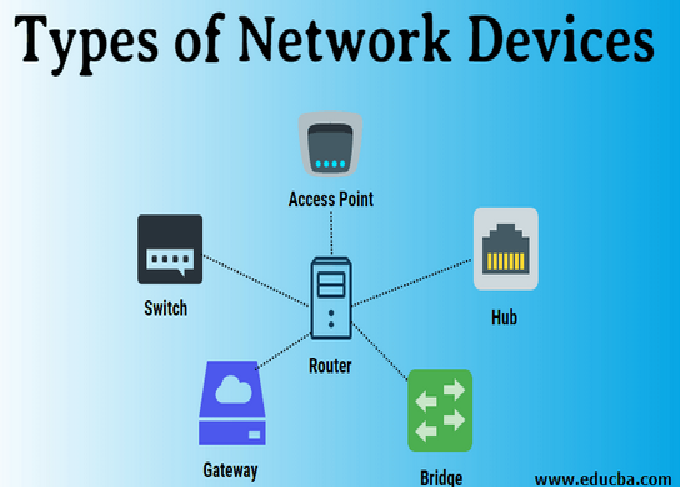
In today’s hyper-connected digital world, networking is the foundation of every organization’s IT infrastructure. Whether you’re setting up a small office network or managing large-scale enterprise systems, understanding networking devices is crucial. These devices not only enable communication between computers but also ensure data security, speed, and reliability. In this comprehensive guide, we’ll explore the top 10 networking devices every IT professional should know, their functions, and how they contribute to smooth network operations.
1. Router – The Brain of the Network
A router is one of the most essential networking devices. It connects multiple networks and directs data packets between them. In simple terms, a router decides the best path for data to travel from the source to the destination.
Key Functions of a Router:
-
Traffic Management: Routes data packets efficiently between networks.
-
Network Segmentation: Divides large networks into smaller, manageable segments.
-
Security Features: Includes firewalls, VPN support, and packet filtering.
-
Dynamic Routing: Uses routing protocols such as OSPF, RIP, and BGP to update network paths dynamically.
Example Use:
In a home network, a Wi-Fi router connects your devices (phones, laptops, TVs) to the internet via your ISP. In enterprise setups, high-end routers manage traffic across multiple branches and remote sites.
2. Switch – The Network Organizer
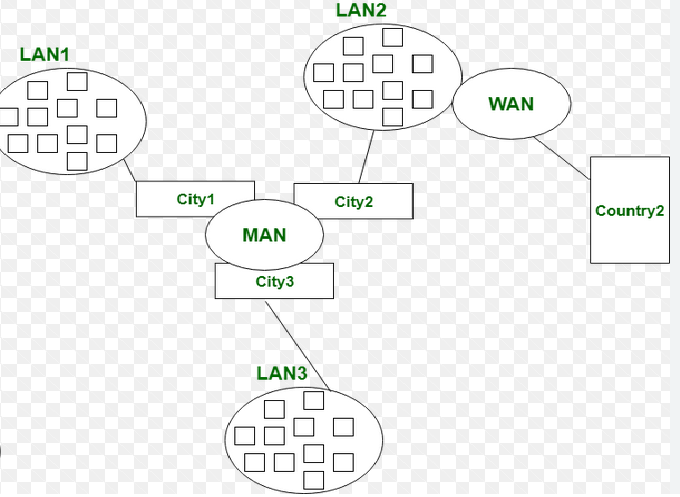
A network switch connects multiple devices on a local area network (LAN) and manages the flow of data between them. Unlike a hub, a switch intelligently sends data only to the device that needs it.
Types of Switches:
-
Unmanaged Switch: Simple plug-and-play devices suitable for small networks.
-
Managed Switch: Offers configuration options, VLAN support, and monitoring for enterprise use.
-
Layer 3 Switch: Combines the functionality of a router and switch, enabling routing between VLANs.
Key Benefits:
-
Reduces network congestion by directing data efficiently.
-
Enhances network performance and security.
-
Supports Quality of Service (QoS) for prioritizing traffic.
Example Use:
In an office, a switch connects all computers, printers, and servers so they can communicate within the same network.
3. Hub – The Basic Connector
A hub is a simple device that connects multiple computers in a network and transmits data to all devices, regardless of the destination. It operates at the physical layer (Layer 1) of the OSI model.
Types of Hubs:
-
Active Hub: Amplifies signals before transmitting.
-
Passive Hub: Only connects devices without amplifying signals.
Limitations of a Hub:
-
Broadcasts data to all devices, leading to collisions.
-
No data filtering or intelligent routing.
-
Lower performance compared to switches.
Example Use:
Hubs are mostly used in small or temporary networks where performance and security are not critical.
4. Modem – The Gateway to the Internet
A modem (modulator-demodulator) converts digital data from a computer into analog signals for transmission over phone lines or cable systems—and vice versa.
Types of Modems:
-
DSL Modem: Uses telephone lines for internet access.
-
Cable Modem: Uses coaxial cables to connect to ISPs.
-
Fiber Modem (ONT): Works with fiber-optic connections for high-speed data transfer.
Functions:
-
Enables internet access by connecting the local network to the ISP.
-
Converts data formats between analog and digital.
-
Often built into modern routers as a combo device.
Example Use:
Your home internet connection typically relies on a modem to communicate with your service provider’s network.
5. Access Point (AP) – The Wireless Connector
A wireless access point (WAP) allows Wi-Fi devices to connect to a wired network. It acts as a bridge between wireless and wired networks.
Key Features:
-
Signal Extension: Expands Wi-Fi coverage in large buildings.
-
Multiple Device Connectivity: Supports multiple users and devices simultaneously.
-
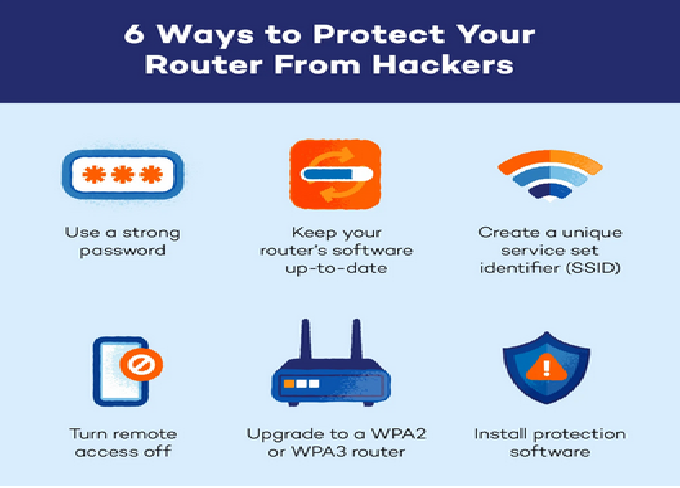
Security Options: Includes WPA3 encryption and user authentication.
Access Point vs Router:
While routers manage the overall network and IP addressing, access points extend wireless coverage and handle Wi-Fi traffic.
Example Use:
In an enterprise building, multiple access points are strategically placed to ensure seamless wireless connectivity for all users.
6. Network Interface Card (NIC) – The Data Translator
A Network Interface Card (NIC) is a hardware component that enables a device to connect to a network. Every device that connects to a network—be it wired or wireless—has a NIC.
Types of NICs:
-
Ethernet NIC: For wired connections using LAN cables.
-
Wireless NIC: For connecting to Wi-Fi networks.
Functions:
-
Converts data into signals suitable for network transmission.
-
Handles both sending and receiving data packets.
-
Has a unique MAC (Media Access Control) address for device identification.
Example Use:
Desktop computers often have Ethernet NICs for high-speed wired connections, while laptops use wireless NICs for mobility.
7. Repeater – The Signal Booster
A repeater is a device used to regenerate or amplify network signals that weaken over long distances. It operates at the physical layer of the OSI model.
Key Benefits:
-
Extends the range of wired and wireless networks.
-
Prevents data loss due to signal degradation.
-
Useful for large buildings, campuses, or outdoor networks.
Example Use:
In a large office, a repeater can be placed between two sections of a building to ensure strong and consistent network signals.
8. Bridge – The Network Divider and Combiner
A bridge connects two or more network segments, helping manage traffic between them. It operates at the data link layer (Layer 2) and filters traffic based on MAC addresses.
Functions:
-
Reduces network collisions by segmenting traffic.
-
Enhances performance by managing data flow between segments.
-
Can connect different types of networks (e.g., wired and wireless).
Example Use:
A bridge can connect two LAN segments, ensuring that only relevant data passes between them, reducing unnecessary traffic.
9. Gateway – The Protocol Translator
A gateway is one of the most critical networking devices, acting as an entry and exit point between two networks that use different protocols. It operates across multiple layers of the OSI model.
Functions:
-
Converts data between different network formats and protocols.
-
Controls traffic between internal and external networks.
-
Often includes firewall and proxy capabilities for security.
Example Use:
In an enterprise, a gateway connects the internal corporate network to the external internet, ensuring compatibility and security between systems.
10. Firewall – The Network Protector
A firewall acts as a barrier between trusted internal networks and untrusted external networks (like the internet). It monitors, filters, and controls incoming and outgoing network traffic based on predefined security rules.
Types of Firewalls:
-
Hardware Firewall: A dedicated device installed between the network and the internet.
-
Software Firewall: Installed on individual devices to protect against unauthorized access.
-
Next-Generation Firewall (NGFW): Combines traditional firewall functions with deep packet inspection, intrusion prevention, and application awareness.
Functions:
-
Blocks unauthorized access while permitting legitimate communication.
-
Protects against malware, hackers, and data breaches.
-
Logs traffic for analysis and troubleshooting.
Example Use:
Organizations deploy firewalls to protect sensitive data, monitor network activities, and comply with cybersecurity policies.
Understanding How These Devices Work Together
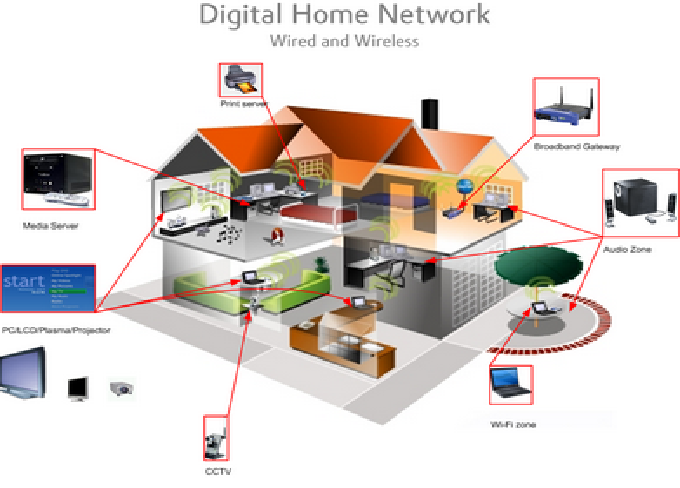
Networking devices don’t work in isolation—they function together to create a complete communication system. Here’s a quick overview of how they interact:
-
Modem connects to the ISP for internet access.
-
Router distributes this internet connection to different devices or sub-networks.
-
Switch connects local devices and directs traffic efficiently.
-
Access Points provide wireless connectivity to mobile devices.
-
Firewall monitors and protects data from external threats.
This collaboration ensures that data travels securely, quickly, and efficiently across networks.
Importance of Networking Devices in IT Infrastructure
Networking devices play a vital role in shaping the performance and reliability of any IT system. Here’s why they’re indispensable for IT professionals:
-
Communication: They enable seamless data transfer between devices and users.
-
Security: Devices like firewalls and routers protect sensitive information.
-
Scalability: Switches, access points, and routers allow networks to grow effortlessly.
-
Performance Optimization: Proper network design minimizes latency and congestion.
-
Troubleshooting and Management: Managed devices provide insights into traffic and performance.
Understanding how these devices operate gives IT professionals the ability to design robust, efficient, and secure networks.
Emerging Trends in Networking Devices
The networking landscape is evolving rapidly, and IT professionals must stay updated with the latest advancements:
1. Software-Defined Networking (SDN):
SDN decouples network control from hardware, allowing centralized management through software. It makes networks more flexible and easier to configure.
2. Network Function Virtualization (NFV):
NFV replaces physical devices like routers and firewalls with virtualized versions, reducing hardware costs and increasing scalability.
3. Wi-Fi 7 and Beyond:
Next-generation access points offer ultra-fast wireless speeds, low latency, and better security for modern devices.
4. Cloud Networking:
Cloud-managed networking devices allow administrators to monitor and manage infrastructure remotely, offering flexibility and centralized control.
5. AI-Powered Network Management:
AI and machine learning help automate network optimization, detect anomalies, and predict failures before they occur.
Tips for IT Professionals to Master Networking Devices
-
Hands-On Practice: Set up small networks using routers, switches, and firewalls to understand real-world configurations.
-
Get Certified: Pursue certifications like CCNA, CompTIA Network+, or Juniper JNCIA to validate your skills.
-
Stay Updated: Networking technologies evolve quickly—follow industry trends and vendor updates.
-
Learn Troubleshooting: Understanding how to diagnose and fix network problems is a key IT skill.
-
Experiment with Virtual Labs: Use platforms like Cisco Packet Tracer or GNS3 to simulate complex network topologies.
Conclusion
Networking devices form the backbone of all digital communication. From routers and switches to firewalls and gateways, each device has a specific role in ensuring that data flows smoothly and securely across networks. For IT professionals, mastering these devices isn’t just about connecting systems—it’s about understanding how to build, maintain, and protect the networks that power the modern world.
Whether you’re setting up a home office, managing a corporate network, or designing data center infrastructure, these top 10 networking devices—Router, Switch, Hub, Modem, Access Point, NIC, Repeater, Bridge, Gateway, and Firewall—are the building blocks you must know. As technology continues to advance, having a strong grasp of these fundamentals will keep you ahead in your IT career and ready to tackle the networking challenges of tomorrow.