



In today’s digital world, almost every task — from browsing the web to streaming a movie or storing data in the cloud — relies on computer networks. These invisible systems connect millions of devices, enabling communication and data sharing across the globe. But how exactly do computer networks work? How do cables, routers, servers, and clouds work together to deliver information in milliseconds?
This detailed guide breaks down how computer networks operate, covering everything from physical cables to complex cloud infrastructures that power the modern Internet.
1. What Is a Computer Network?
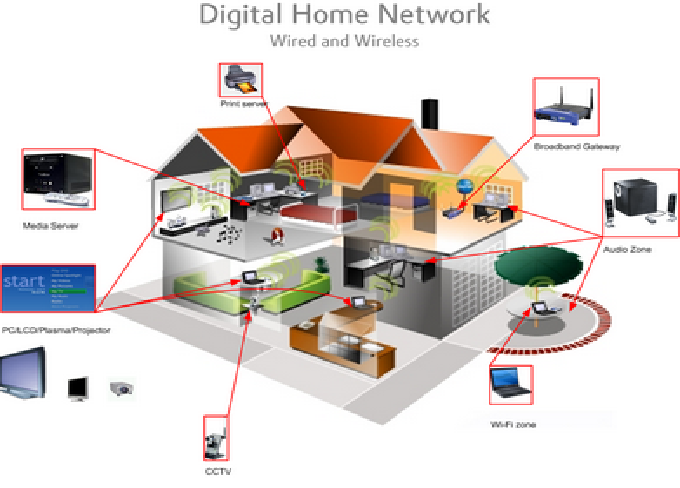
A computer network is a system that connects multiple computing devices (like computers, servers, and routers) to share data and resources. Networks can range from small local setups in homes or offices to massive global networks like the Internet.
Every network, regardless of size, has one main purpose: to enable communication and resource sharing between devices.
2. Basic Components of a Network
To understand how a network functions, it’s essential to know its basic components:
a. Devices (Nodes)
These include:
-
Computers and laptops – used by end-users to send or receive information.
-
Servers – store data, host websites, or manage applications.
-
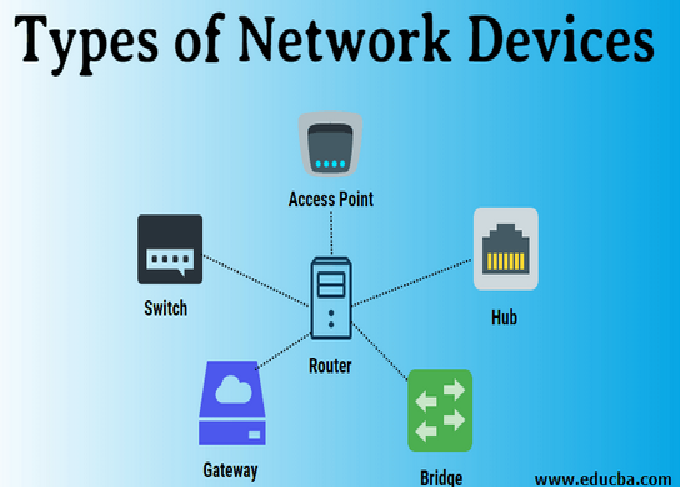
Routers and switches – control and direct traffic within the network.
-
Modems – connect the local network to the Internet.
b. Transmission Media
This is the physical or wireless medium that carries data signals:
-
Cables (Ethernet, fiber optic, coaxial) for wired connections.
-
Wi-Fi and radio waves for wireless communication.
c. Network Interface Cards (NICs)
Every device connected to a network has a network interface card. This card allows communication by converting data into signals that can be transmitted over the network.
d. Network Protocols
Protocols are sets of rules that define how data is transmitted and received. The most common include:
-
TCP/IP (Transmission Control Protocol/Internet Protocol)
-
HTTP/HTTPS (Hypertext Transfer Protocol)
-
FTP (File Transfer Protocol)
-
DNS (Domain Name System)
Together, these components form the foundation of all network communication.
3. Types of Computer Networks
Computer networks come in different types based on size and reach:
a. LAN (Local Area Network)
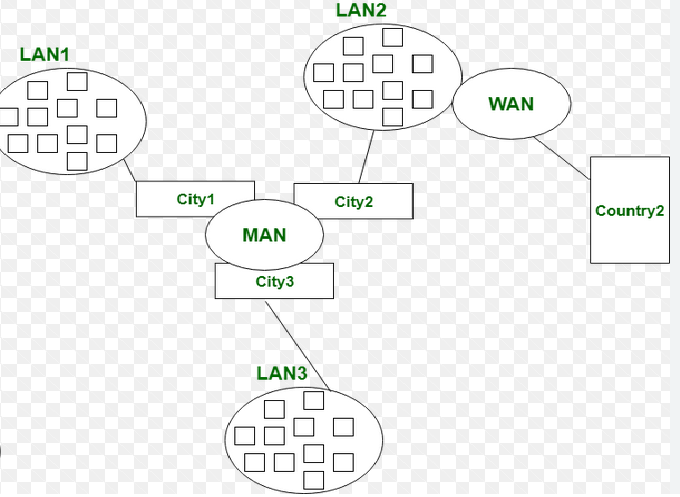
A LAN connects devices within a limited area like a home, office, or school. It uses Ethernet cables or Wi-Fi to connect devices.
b. WAN (Wide Area Network)
A WAN covers large geographical areas and connects multiple LANs using routers and long-distance transmission methods. The Internet itself is the largest WAN.
c. MAN (Metropolitan Area Network)
A MAN connects multiple LANs within a city or large campus, often using high-speed connections.
d. WLAN (Wireless Local Area Network)
A WLAN uses wireless communication (like Wi-Fi) to connect devices within a local area, eliminating the need for physical cables.
e. PAN (Personal Area Network)
A PAN connects devices close to one person, such as smartphones, laptops, and Bluetooth headphones.
4. How Data Moves in a Network
At its core, networking is about data transmission. When you send a message, open a website, or watch a video, your data travels through multiple layers and devices to reach its destination.
Let’s break this down step-by-step:
a. Data Is Broken Into Packets
When you send data over a network, it’s divided into small chunks called packets. Each packet contains:
-
A header (with sender and receiver addresses)
-
A payload (actual data)
-
A trailer (used for error checking)
b. Packets Travel Through Devices
Packets move from your computer to a router, then to other routers or switches, following the best available path across the network.
c. IP Addresses Identify Destinations
Every device connected to the Internet has a unique IP address, like a home address. This helps routers know where to send each packet.
d. Protocols Ensure Delivery
The TCP part of TCP/IP ensures that all packets arrive correctly and in order. If a packet is lost, TCP requests it again. This guarantees reliable communication.
e. Data Is Reassembled
Once all packets reach the destination, they are reassembled to form the complete file, webpage, or message you requested.
5. The OSI Model: Layers of Networking
The OSI (Open Systems Interconnection) model is a framework that explains how data moves across a network. It divides communication into seven layers, each with a specific function:
-
Physical Layer – deals with physical connections like cables and signals.
-
Data Link Layer – ensures error-free data transfer between devices on the same network.
-
Network Layer – handles addressing and routing (using IP addresses).
-
Transport Layer – ensures reliable delivery using TCP or UDP.
-
Session Layer – manages ongoing connections between devices.
-
Presentation Layer – formats data for applications (e.g., encryption).
-
Application Layer – provides network services to users (e.g., web browsers, email clients).
Together, these layers ensure that data moves seamlessly from one point to another across different types of hardware and software.
6. Wired Networking: From Cables to Switches
Wired networks are known for their stability, speed, and security. Here’s how they work:
a. Ethernet Cables
Ethernet cables (like Cat5e or Cat6) connect devices to switches or routers. They transmit data using electrical signals.
b. Switches
A switch connects multiple devices within a LAN. It learns which devices are connected to which ports and sends data only where it needs to go, reducing congestion.
c. Routers
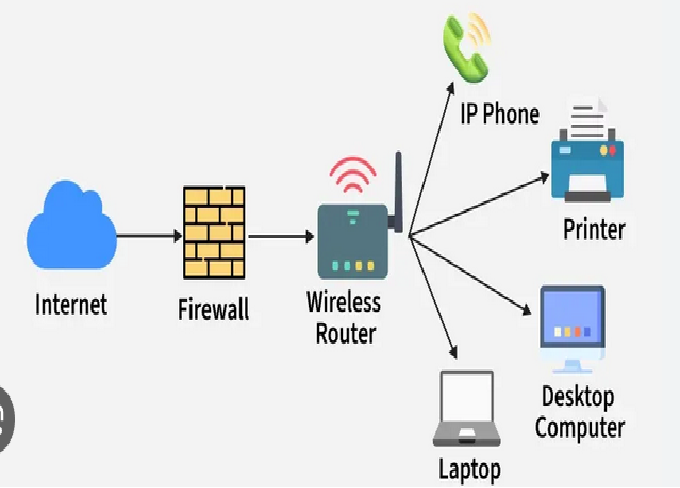
A router connects different networks, such as a LAN to the Internet. It uses IP addresses to direct data packets to their destinations.
d. Fiber Optic Cables
For long-distance, high-speed data transfer, fiber optic cables are used. They transmit data using light signals instead of electricity, allowing speeds up to hundreds of gigabits per second.
7. Wireless Networking: Cutting the Cords
Wireless networking eliminates the need for cables by using radio waves or infrared signals.
a. Wi-Fi
Wi-Fi networks use a wireless router that connects to an Internet modem. Devices communicate with the router over radio frequencies (2.4 GHz or 5 GHz bands).
b. Bluetooth
Bluetooth connects nearby devices like headphones or keyboards over short distances.
c. Cellular Networks
Mobile Internet (4G, 5G) connects smartphones and tablets to the Internet using cell towers.
d. Wireless Security
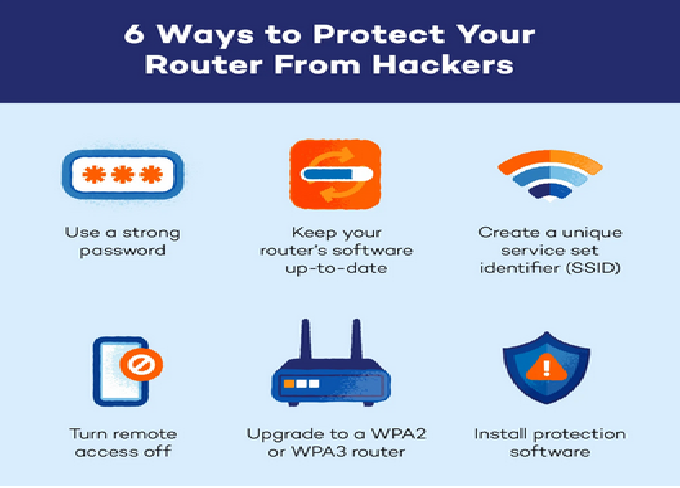
Since wireless networks transmit data through the air, they require encryption (like WPA3) to protect against unauthorized access.
8. Internet Backbone: The Global Network
The Internet is essentially a massive network of networks connected through high-speed cables, satellites, and servers worldwide.
a. Internet Service Providers (ISPs)
ISPs are companies that provide Internet access to homes and businesses. They connect to larger tier-1 networks that form the Internet backbone.
b. Data Centers
Data centers host thousands of servers that store websites, apps, and cloud services. When you access a website, your request is routed to one of these servers.
c. Undersea Cables
More than 95% of global Internet traffic travels through undersea fiber optic cables connecting continents. These cables carry massive amounts of data every second.
d. Domain Name System (DNS)
DNS works like a phonebook for the Internet. It converts domain names (like www.example.com) into IP addresses that computers can understand.
9. The Role of Routers and Switches in Data Flow
Routers and switches act as the traffic directors of a network.
-
Switches operate within a LAN, connecting devices like computers and printers.
-
Routers connect different networks and determine the best route for data to travel.
Advanced routers use Network Address Translation (NAT) to allow multiple devices on a LAN to share a single public IP address.
10. Network Security: Protecting the Flow of Data
Network security ensures data remains safe from hackers and unauthorized access.
a. Firewalls
A firewall monitors incoming and outgoing network traffic and blocks suspicious activity.
b. Encryption
Data encryption converts readable data into unreadable code, ensuring only authorized parties can view it.
c. VPNs (Virtual Private Networks)
VPNs create secure tunnels between devices and servers, hiding your data and location from prying eyes.
d. Intrusion Detection Systems
These systems continuously monitor network activity to detect and respond to threats in real time.
11. Cloud Networking: The Modern Revolution
The rise of cloud computing has transformed traditional networking. Instead of storing data locally, users now store, manage, and access it through remote servers on the Internet — the “cloud.”
a. How Cloud Networks Work
In cloud networking, physical servers in data centers host virtual machines and applications. Users connect through the Internet to access these resources.
b. Types of Cloud Services
-
IaaS (Infrastructure as a Service) – Provides virtualized computing resources (e.g., Amazon EC2).
-
PaaS (Platform as a Service) – Offers platforms for developers to build and deploy applications.
-
SaaS (Software as a Service) – Delivers software via the Internet (e.g., Gmail, Google Drive).
c. Benefits of Cloud Networking
-
Scalability: Add or remove resources easily.
-
Cost Efficiency: Pay only for what you use.
-
Accessibility: Access data from anywhere.
-
Reliability: High uptime and data redundancy.
12. Virtualization and Software-Defined Networking (SDN)
Modern networks are becoming software-driven rather than hardware-dependent.
a. Virtualization
It allows multiple virtual networks to run on a single physical infrastructure, improving efficiency and reducing costs.
b. Software-Defined Networking (SDN)
SDN separates the control and data layers in networking, allowing administrators to manage network behavior through software rather than manual configuration.
This makes networks more flexible, automated, and easier to scale — a key feature in cloud environments.
13. Internet of Things (IoT) and Smart Networking
The Internet of Things (IoT) connects everyday objects — from smart lights to industrial machines — to the Internet.
Each device collects and exchanges data through sensors and networks, enabling automation, monitoring, and smarter decision-making.
IoT relies heavily on wireless networks, edge computing, and cloud services to handle the massive amount of data generated every second.
14. The Future of Computer Networking
Networking is evolving faster than ever. Some key future trends include:
a. 5G and Beyond
5G networks deliver ultra-fast speeds and low latency, enabling real-time applications like autonomous vehicles and remote surgery.
b. Artificial Intelligence in Networking
AI helps automate network management, predict failures, and optimize performance.
c. Quantum Networking
Researchers are exploring quantum communication, which could offer unbreakable security using quantum entanglement.
d. Edge Computing
Instead of sending all data to the cloud, edge computing processes it closer to the source, improving speed and reducing bandwidth use.
15. Conclusion
From simple copper cables to complex cloud-based infrastructures, computer networks are the backbone of modern communication and technology. They allow devices, people, and organizations to connect, share, and collaborate seamlessly — shaping everything from online gaming to global business operations.
Understanding how computer networks work — from the physical layers of cables and switches to the virtual layers of the cloud — helps us appreciate the intricate systems that power our connected world. As technology continues to advance, networking will become even more intelligent, efficient, and essential to our digital lives.